Design Study
3D Website Design For A Technical Product
A fictional marine-robotics concept using immersive 3D to explain a technical product while preserving readable content and accessible fallbacks.
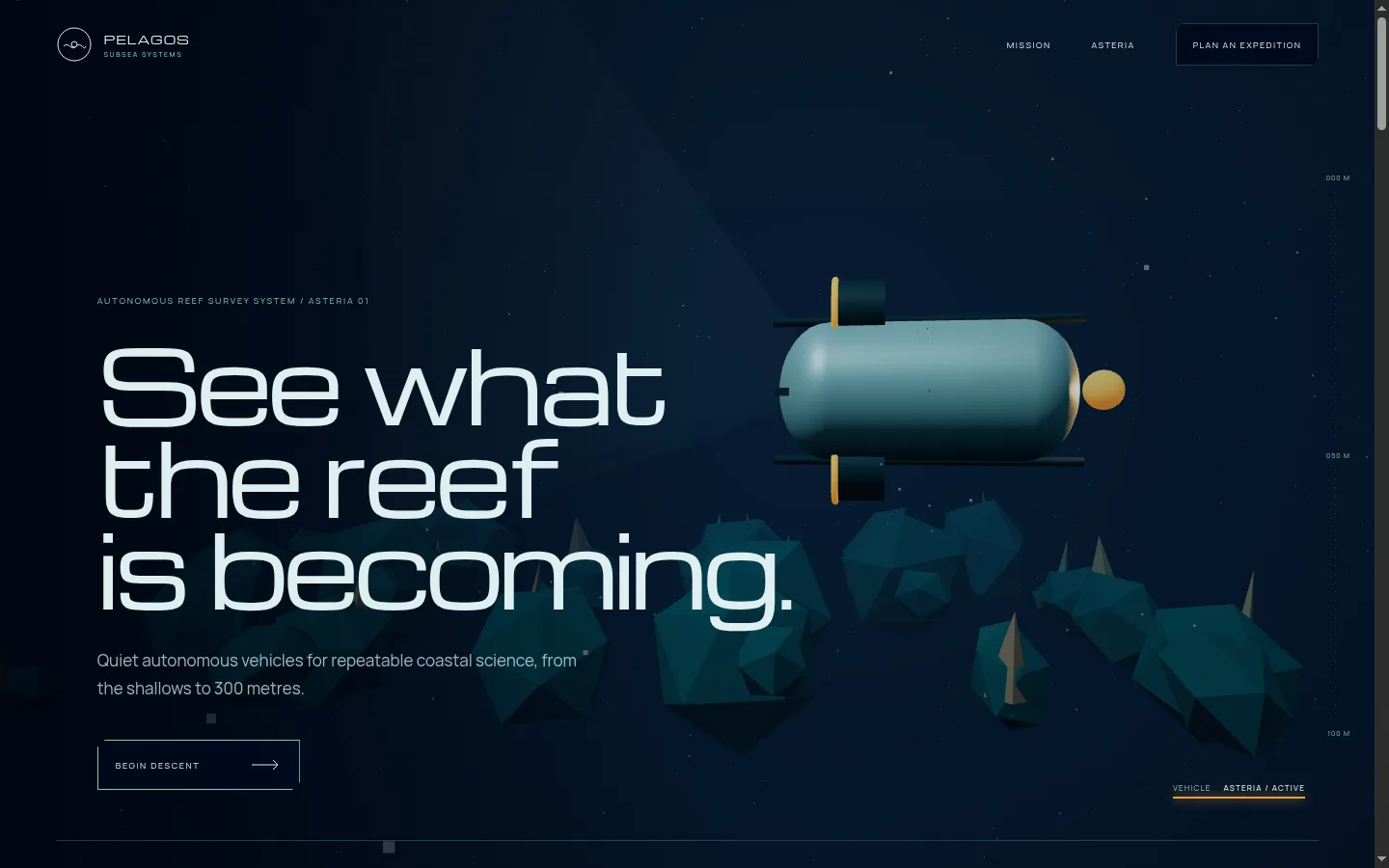
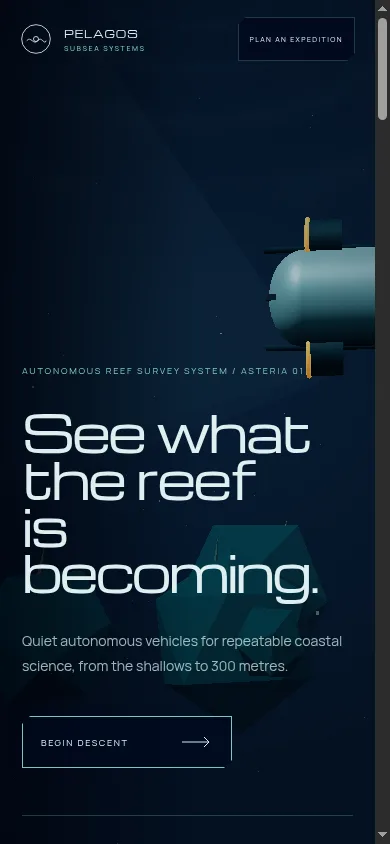
A fictional marine-robotics website showing how a 3D product experience can explain mission logic without turning the page into a technology demo.
The problem with many 3D websites
Interactive 3D websites can make an immediate impression. They can also create immediate confusion.
The visitor may see a beautiful object but have no idea what it does. Navigation can become a game. Text competes with the scene. Mobile performance suffers. The entire experience may disappear if WebGL fails or the connection is weak.
That is especially risky for technical businesses. A research team, procurement stakeholder, or potential partner is not visiting only to be impressed. They need to understand capabilities, limits, operating conditions, and the next step.
Pelagos Subsea was created to test a more useful model.
The fictional company builds compact autonomous vehicles for reef, seagrass, and coastal surveys. The website needed to make the vehicle feel present in its operating environment while answering practical questions about depth, endurance, mapping, sampling, repeatability, and environmental impact.
The central design decision
The ocean is not a background behind the website. It is the environment through which the product is understood.
A procedural Three.js scene remains present while the page moves through the mission narrative. The Asteria vehicle descends through a volumetric water column, passes low-poly reef forms, and responds gently to pointer movement.
The important word is gently.
The visitor does not need to learn game controls. They do not need to steer through a maze. The movement creates spatial presence while the page continues to behave like a normal website.
What the 3D scene communicates
The vehicle model was built from lightweight geometric primitives rather than a large downloaded asset. It includes a main hull, rails, thrusters, a camera eye, and a warm locator light.
These elements support the product explanation:
- The compact hull suggests a two-person field launch.
- The sensor rail supports the modular-payload story.
- The camera eye connects to photogrammetry and habitat mapping.
- The thrusters support the low-noise maneuvering message.
- The surrounding reef explains why precision and disturbance matter.
This is the difference between a decorative 3D model and a product-led 3D experience. The scene reinforces information already present in the content.
The information architecture
The page follows a clear mission sequence:
- See the reef: Establish the research problem and the vehicle.
- Understand the system: Explain the compact hull, modular rail, and optical survey equipment.
- Map, sample, return: Show the complete field loop.
- Review the mission profile: Present depth, endurance, repeatability, and launch mass.
- Explain responsible access: Connect quiet operation and repairability to field practice.
- Plan an expedition: Turn technical interest into a scoped conversation.
The visitor can scan those sections without interacting with the 3D scene. The experience adds depth, but it does not become the only way to access the argument.
Accessibility and failure handling
The essential content lives in semantic HTML above the 3D layer. That decision protects the site in several situations:
- A browser cannot initialize WebGL.
- A device is underpowered.
- A visitor uses assistive technology.
- Reduced motion is enabled.
- A search engine is reading the page.
- The connection is too slow for a rich experience.
In reduced-motion mode, the ocean becomes a calm fixed composition. Pointer steering stops. The text, specifications, and contact path remain complete.
A real technical-product website should always answer this question: if the advanced visual layer fails, does the visitor still receive the full business case?
If the answer is no, the interface is too dependent on the effect.
Performance decisions
Three-dimensional experiences require stricter performance discipline than ordinary marketing pages.
The Pelagos concept uses several practical strategies:
- The scene is built from lightweight primitives.
- Animation values remain outside React state, avoiding a component render on every frame.
- Pointer and scroll listeners are passive where appropriate.
- Camera and vehicle movement use damped interpolation rather than expensive physics.
- Mobile receives lower visual density.
- The primary React content remains separate from the heavier Three.js engine chunk.
The result is still more demanding than a static page, but the complexity is attached to a clear purpose.
SEO for an interactive 3D website
A canvas does not give search engines enough context by itself. Descriptive content has to explain the product in ordinary language.
For a real marine-robotics company, the SEO-conscious structure could include pages for:
- Autonomous underwater vehicles.
- Reef mapping and photogrammetry.
- Seagrass and coastal surveys.
- Sensor payloads.
- Expedition planning.
- Technical specifications.
- Research methods and field notes.
The main page should use clear headings and text that names the product category, users, operating environment, and applications. Technical diagrams, downloadable specifications, and methodology pages can support both search visibility and buyer confidence.
The 3D layer creates memorability. The content architecture creates discoverability.
What this concept demonstrates
Pelagos demonstrates the ability to combine visual ambition with technical clarity.
The observable work includes:
- A custom procedural WebGL environment.
- A modeled product object created from lightweight geometry.
- Pointer and scroll-linked spatial movement.
- Responsive scene-density changes.
- Semantic content independent of the canvas.
- Reduced-motion and WebGL-failure fallbacks.
- A clear expedition-planning call to action.
The project does not claim real expeditions, scientific partnerships, survey results, or product performance. It demonstrates design and implementation capability through the live build.
When a business should use 3D
3D is useful when spatial understanding improves the sales argument.
Strong use cases include:
- Physical products whose form or mechanism matters.
- Architecture and real estate where space affects the decision.
- Engineering products that operate in a specific environment.
- Furniture, lighting, fashion, and objects that benefit from close inspection.
- Educational experiences where movement explains a process.
It is less useful when the business problem can be solved with better copy, photography, navigation, or a straightforward demonstration.
The right question is not, “Would 3D look impressive?”
It is, “Would seeing this product in space help the visitor understand or choose it?”
Plan a standout technical website
If your product needs more than a standard feature page, the project scope should account for content architecture, interaction design, performance budgets, accessibility fallbacks, mobile behavior, and technical QA from the beginning.