Design Study
Interactive Product Website Design For Music Hardware
A fictional synthesizer concept where the page behaves like a visual instrument while keeping controls, feedback, and the product story clear.
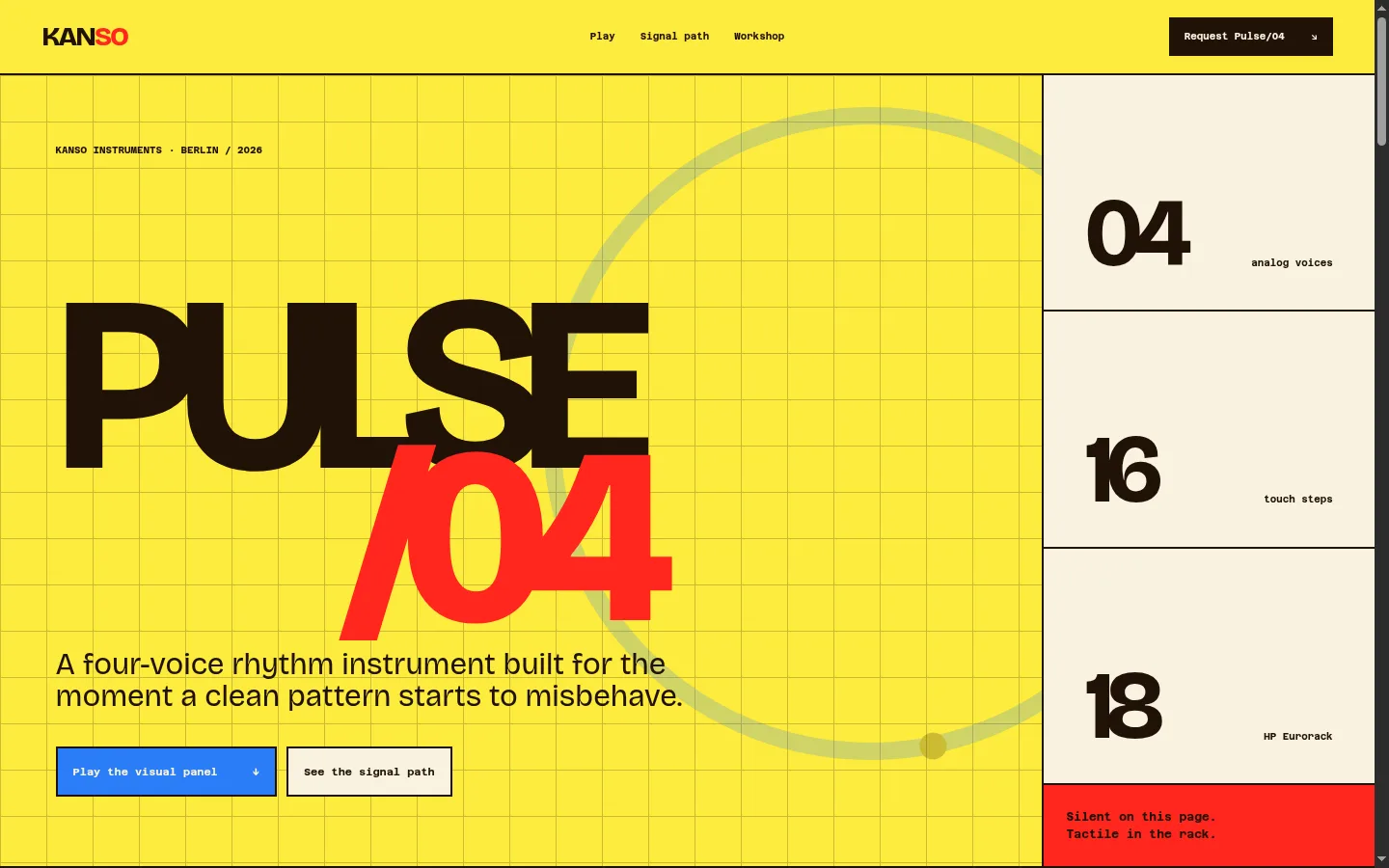
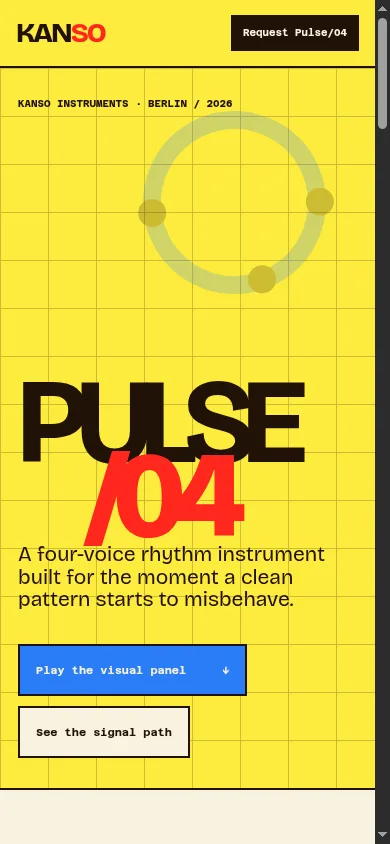
A fictional synthesizer website concept showing how interaction can demonstrate a product while keeping the interface clear, responsive, and easy to understand.
The product-website challenge
A product page normally explains features through copy, images, video, and specifications. That works well for many products. It can feel incomplete when the product is defined by touch, timing, experimentation, or immediate feedback.
Pulse/04 is a fictional four-voice rhythm instrument. Its central idea is that a clean pattern becomes more interesting when timing, pressure, and repetition begin to drift.
A static product render could show what the front panel looks like. It could not communicate the feeling of adjusting controls and changing a pattern.
The Kanso website therefore needed to act like a small visual instrument.
The risk was obvious: if the page looked too much like an experimental interface, visitors might not understand the product name, what the controls do, whether audio should play, or how to continue through the page.
The design had to balance play with orientation.
A clearer opening experience
The first viewport presents the product before asking for interaction.
Visitors see:
- The Pulse/04 name in large, readable typography.
- A one-sentence product description.
- The core specifications: four voices, sixteen steps, and an eighteen-HP Eurorack format.
- A direct link to the visual panel.
- A second link to the signal-path explanation.
- A clear note that the page demonstration is silent.
That sequence removes the most common sources of confusion. The visitor knows what they are looking at, what they can do, and what not to expect.
The interactive panel
The central panel includes three types of interaction.
Continuous controls
Tone, Fold, and Motion use accessible range inputs. Their values influence the canvas visualization.
The controls are visually represented as hardware knobs, but they remain real browser inputs with keyboard focus and understandable labels.
Signal modes
Pulse, Divide, and Scatter change the waveform behavior. Each mode has a visible selected state and uses ordinary buttons with aria-pressed status.
Sixteen-step pattern
The sequencer pads allow visitors to create a visual rhythm. Active pads use strong color states. Randomize, Clear, and Reset controls make experimentation reversible.
Reversibility matters. A playful interface feels safer when the visitor knows they cannot break it.
Live feedback reduces confusion
The page translates the current control state into a simple sentence, for example:
Scatter mode. Seven of sixteen steps active. Balanced tone and open rhythm.
This message updates as the visitor changes the panel. It serves two purposes:
- It confirms that the interaction worked.
- It describes the visual state without requiring someone to interpret the canvas.
The canvas remains decorative. The controls and status text carry the usable information.
Visual direction
Kanso avoids the default black-and-neon synthesizer aesthetic.
The visual system combines:
- Early electronic-instrument manuals.
- Screen-printed Berlin gig posters.
- Graph paper and circuit-board traces.
- Yellow solder-mask color.
- Red signal states.
- Blue patch-cable color.
- Dark Bakelite-like control surfaces.
Large typography gives the page energy, while strict borders and technical labels keep the product understandable.
The interface is loud because the fictional brand is restless and mechanical. The underlying hierarchy remains controlled.
Explaining the product after the interaction
The website does not assume that playing with the panel is enough.
The next section explains the signal path in four stages:
- Touch or control voltage enters the system.
- The signal is shaped without menu navigation.
- Related voices drift while remaining connected.
- Four outputs carry the result into a larger modular setup.
The workshop section then explains repairability, production capacity, assembly, and calibration. This moves the visitor from curiosity to confidence.
The final allocation section presents price, timing, and what to include in an inquiry.
SEO and product content
Interactive product websites still need ordinary product language.
For a real music-hardware brand, useful search-focused pages could include:
- Product overview and specifications.
- Eurorack compatibility.
- Signal-flow documentation.
- Patch examples.
- Service and repair information.
- Firmware or manual downloads when relevant.
- Comparisons between instruments or modules.
- Workshop and manufacturing information.
The page should naturally use the terms musicians and buyers use when evaluating the product. Interactive graphics can demonstrate the feeling, while structured copy answers technical questions.
What this concept demonstrates
Kanso demonstrates a website where interaction is part of the product explanation.
The observable work includes:
- A pointer-reactive generative canvas.
- Accessible range controls styled as hardware knobs.
- Stateful signal modes.
- A sixteen-step visual sequencer.
- Randomize, clear, and reset actions.
- A live plain-language status description.
- Strong responsive behavior on small screens.
- Reduced-motion support.
It does not claim hardware sales, customer feedback, workshop output, or product reviews.
How other businesses can apply the approach
The product does not need to be a synthesizer.
An interactive product website can help when customers benefit from trying a simplified version of the core experience:
- A lighting brand can let visitors compare glow and material.
- An interior studio can let visitors explore room directions.
- A fitness service can build a simple plan selector.
- A software company can demonstrate the primary workflow.
- A restaurant can let visitors build a tasting menu.
- A real-estate business can let visitors filter by lifestyle priorities.
The interaction should answer a buying question. It should not exist only to prove that the website can animate.
Plan an interactive product website
Interactive websites require more than visual design. They need instructions, feedback, reset states, keyboard behavior, mobile adaptation, reduced-motion handling, and a clear route toward purchase or inquiry.